IDE HUB · ACCESS CONTROL SOFTWARE

Runs on your local server. Managed from any browser.

Decide who can go where and when, monitor doors and automate responses to events. From visitor management to reporting, IDE Hub brings daily operations into one interface. It runs at your site and is managed through a browser on your computer or phone, over the local network or through authorized remote access.

  • On-site data storage
  • Daily operation without internet
  • Remote management without a VPN
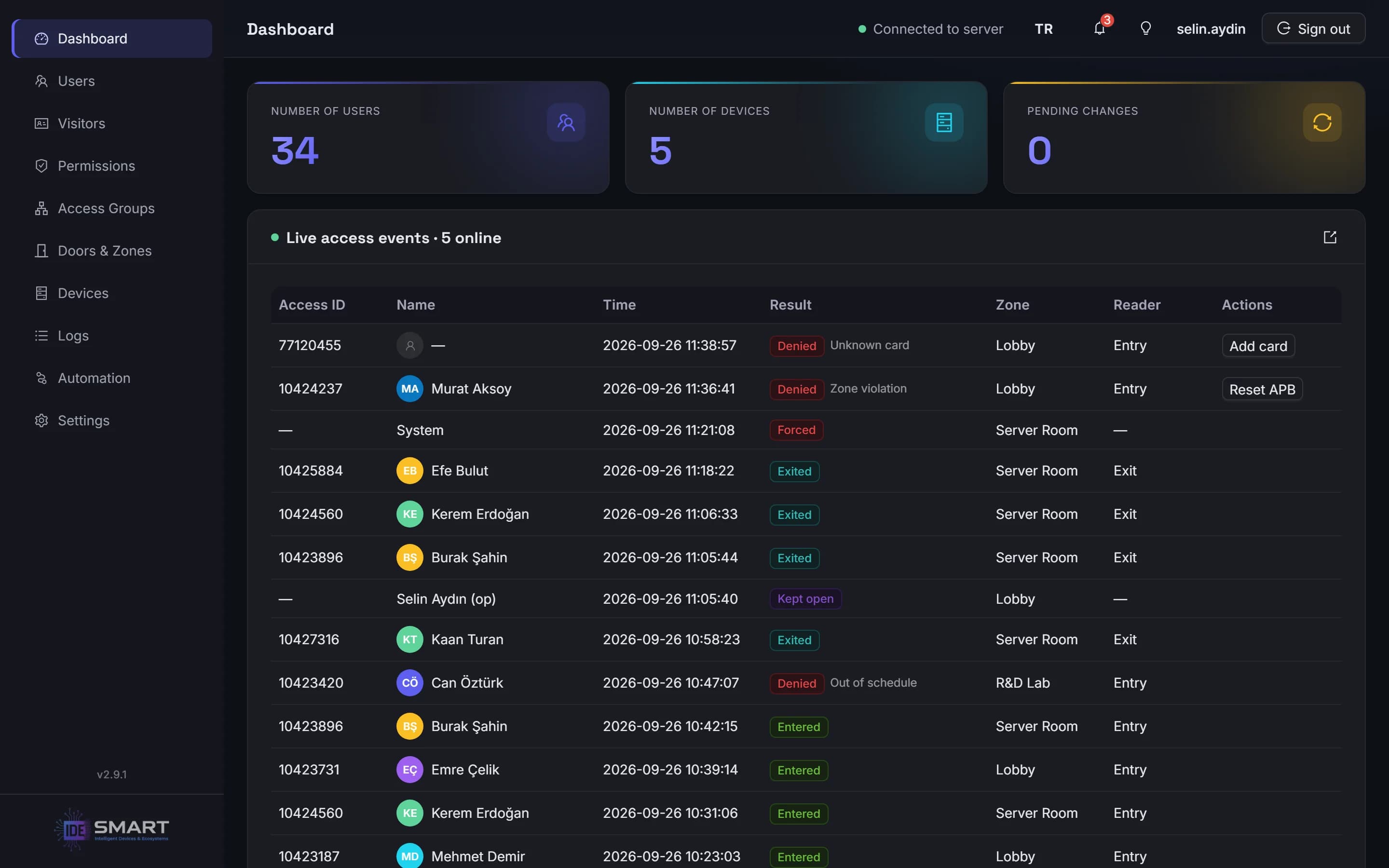
The IDE Hub dashboard with live access events

How it works

Designed for ease, from setup to daily use.

  1. 01

    Decisions at the door

    IDE-DC100, IDE-DC150 and IDE-DC300 controllers make access decisions locally. If the network or server connection is lost, access rules stored on the controller continue to operate.

    Devices
  2. 02

    Installed on a local server

    IDE Hub is installed on a Windows PC on your local network. Access records are stored on site in an encrypted database, and controllers communicate with the server over TLS-encrypted connections.

  3. 03

    Management in your browser

    Manage the system from a computer or phone on the local network, without installing a separate client application. When off-site access is needed, authorized users can connect through the hub without a VPN.

Daily local operation does not require internet access. Internet is required for initial setup, adding devices and remote access.

Remote management

Take action without a site visit. Stay in control of access.

No VPN, port forwarding or static IP required.

Add people, open doors, acknowledge alarms and review records from the same management interface you use on site. Access it from the office, home or your phone. IDE Hub initiates the connection to the hub, so there is no need to open router ports, obtain a static IP or configure a VPN.

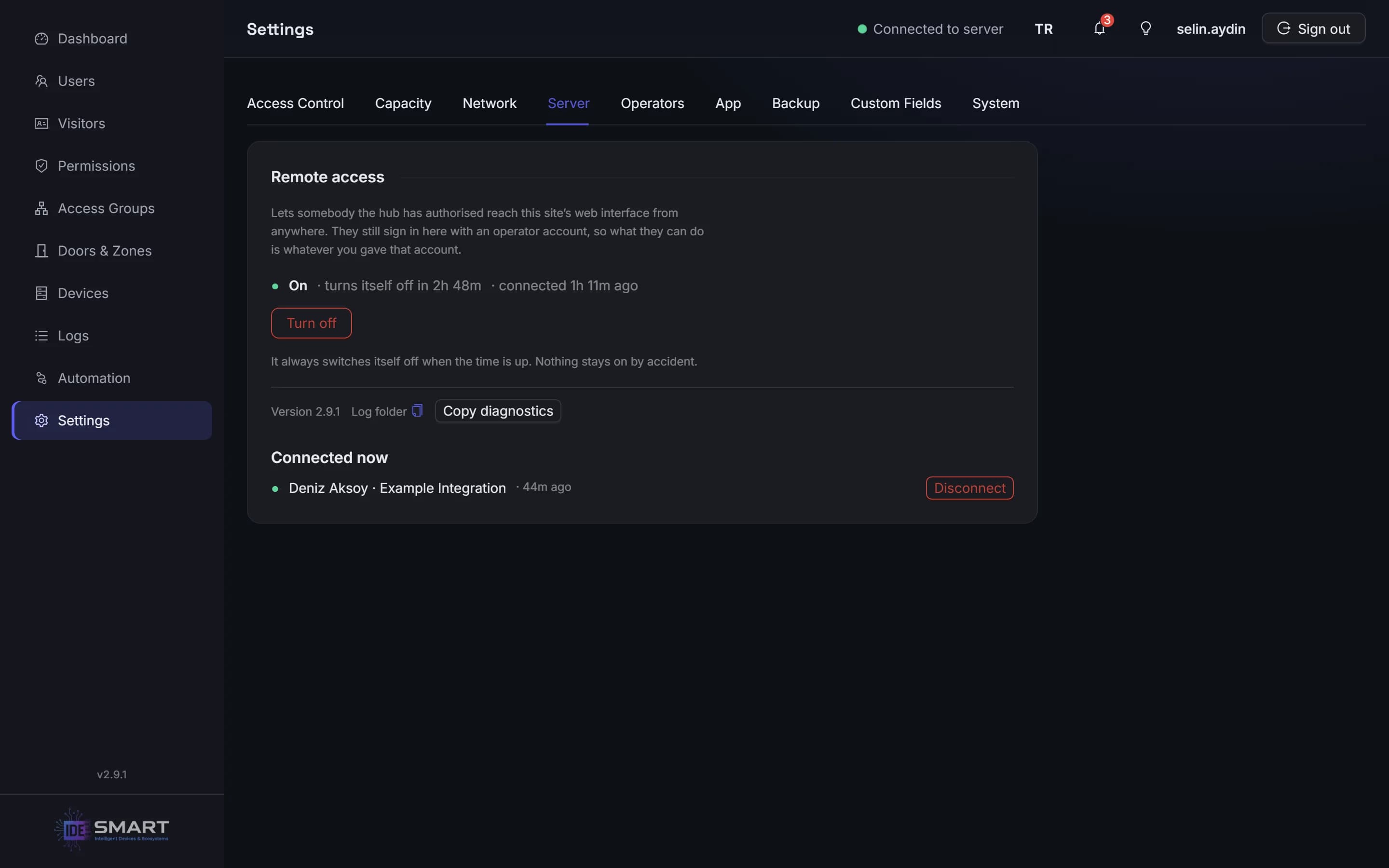
  • Enable access on your terms. Turn remote access on from the local interface. Keep it available or limit it to 1, 4, 8 or 24 hours.

  • Choose who can connect. Authorize users individually or share a time-limited access link. View active connections and end them when needed.

  • Keep actions traceable. Remote users sign in with the site's operator accounts, and their actions are recorded in the audit log.

Integrators can provide support remotely, within the access granted and without a site visit.

Remote access switched on, with the time remaining and a connected user

People and permissions

Give each person the access they need.

Set permissions around the way your site operates. Define which doors each person can use, on which dates, at what times and how often.

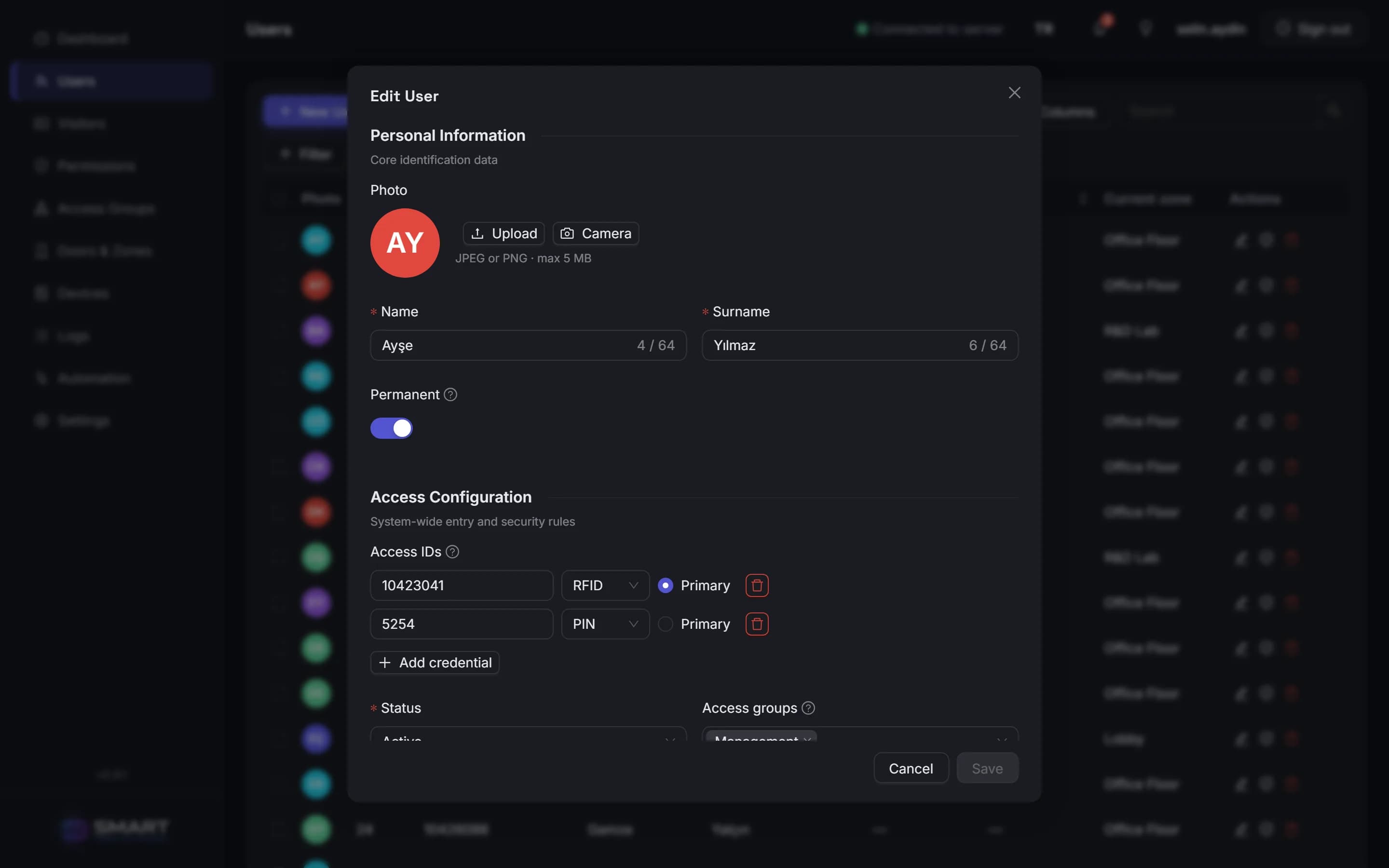
  • Keep each person's details together. Manage photos, validity dates and custom fields, with multiple cards and PINs per person.

  • Control when and how often access is allowed. Set time windows using weekly, monthly and yearly rules, with daily, weekly, monthly or yearly usage limits.

  • Save time with bulk import. Bring in your staff list from CSV or Excel in one step.

Editing a person: card and PIN credentials

Doors and zones

Act on doors instantly. See movement across your site.

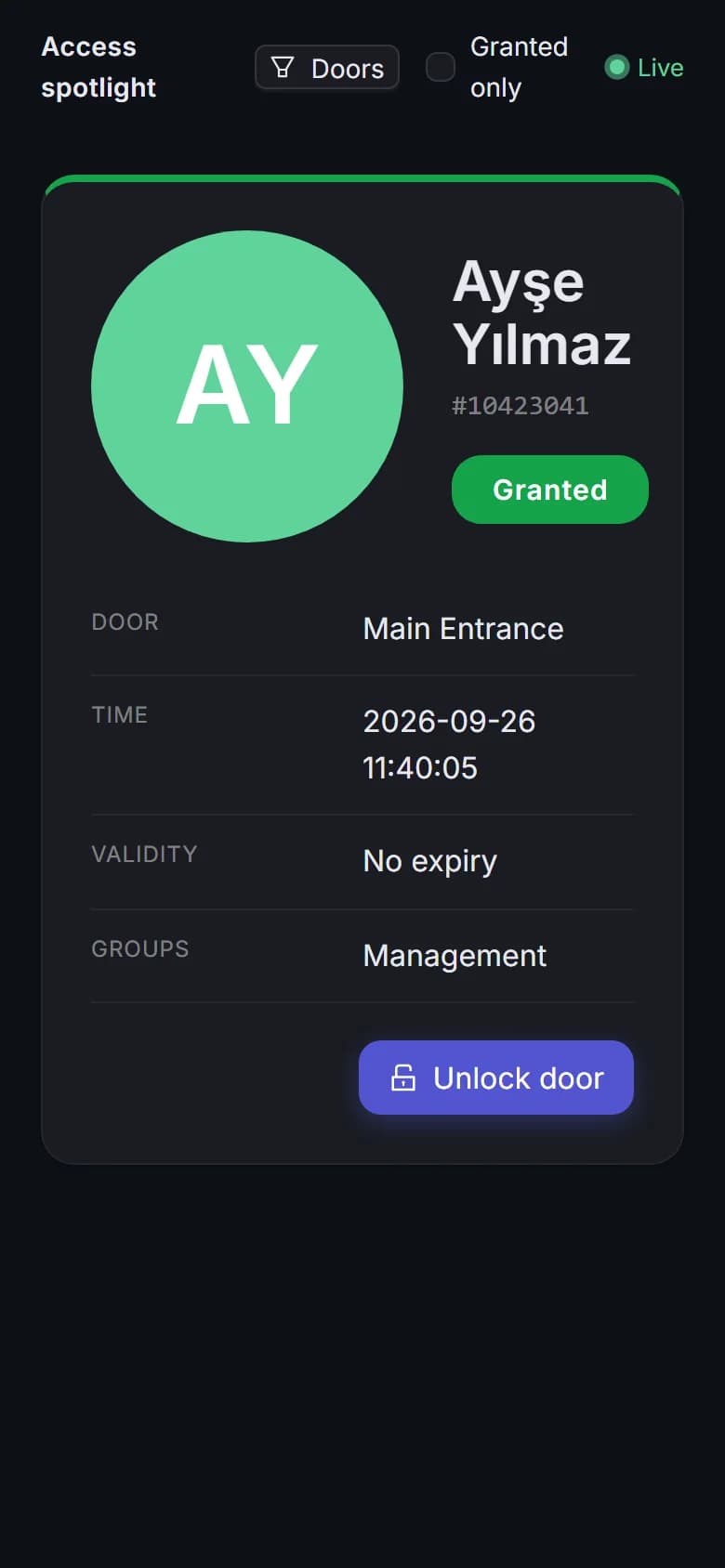
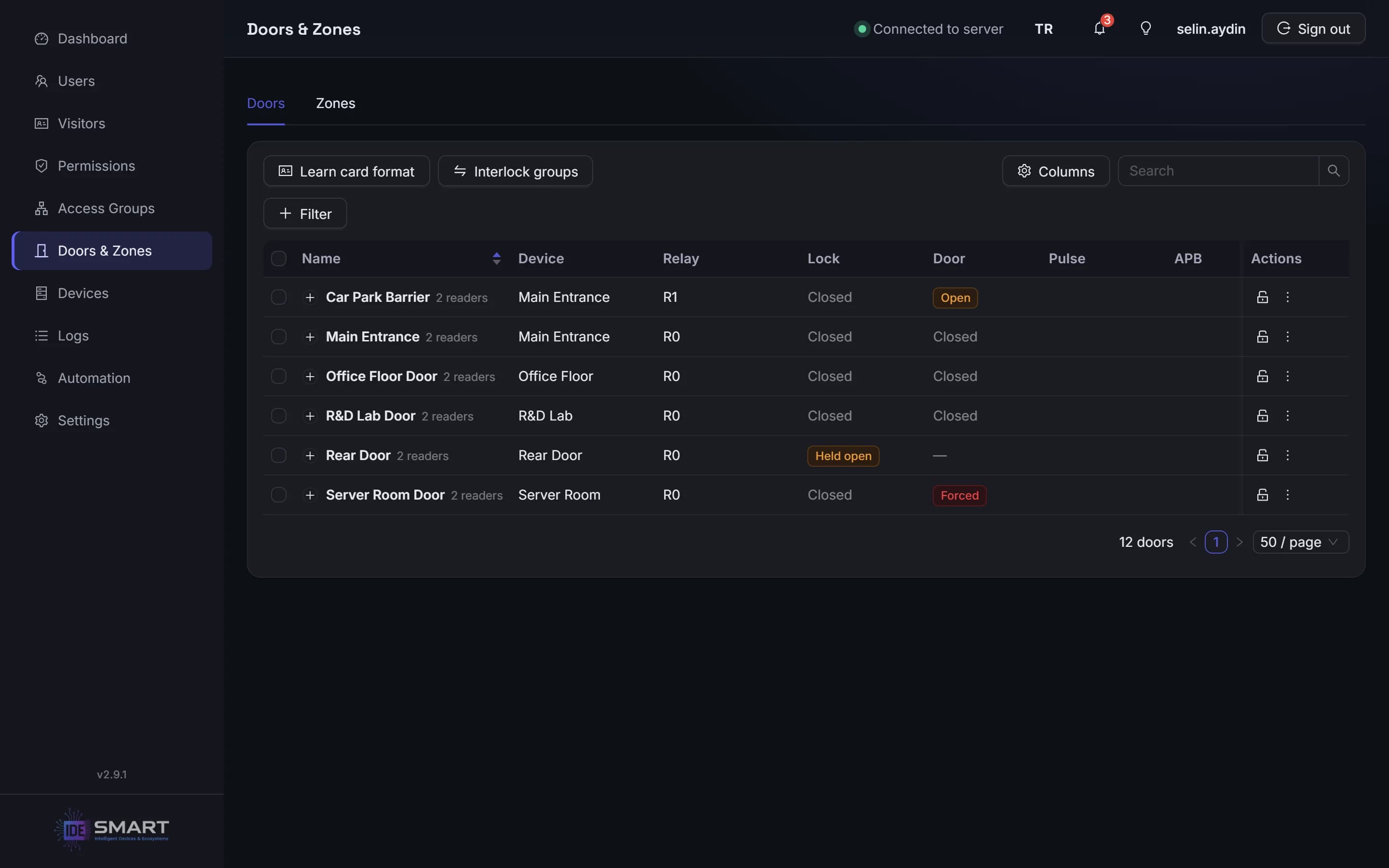
Open, hold open or lock doors from one interface. Organize zones in a hierarchy that reflects your facility, and see who is in each zone in real time based on recorded access events.

Additional control for sensitive areas: Apply anti-passback in soft or strict mode. Use interlocking to prevent two doors from opening at the same time, and apply a two-person rule to require two authorized people for access to designated areas.

Live lock and door state for every door

Alarms and emergencies

See priority alarms and track the response.

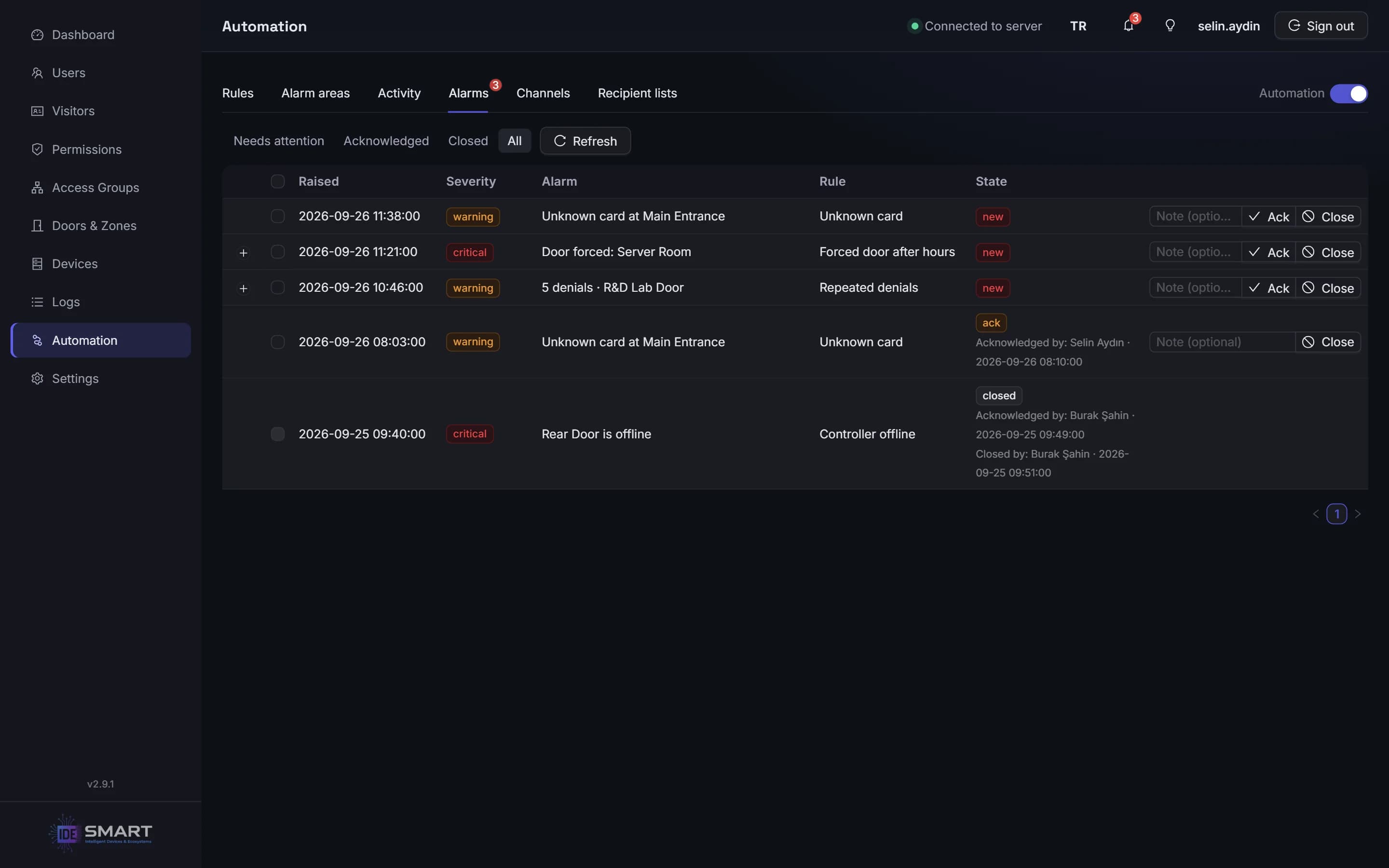
Detect forced and held-open doors, with a configurable buzzer or relay response for each door. Arm and disarm alarm areas, and activate a siren when a detector is triggered.

Review alarms by severity. Each acknowledgment is recorded with the operator's name, and unacknowledged alarms are escalated. See which alarms have been acknowledged and by whom.

Emergency response at the controller: When the fire input is activated, every door on that controller opens. The controller handles this directly, without requiring a server connection.

Alarms with their severity and who acknowledged or closed them

Automation

Let rules handle repeatable tasks.

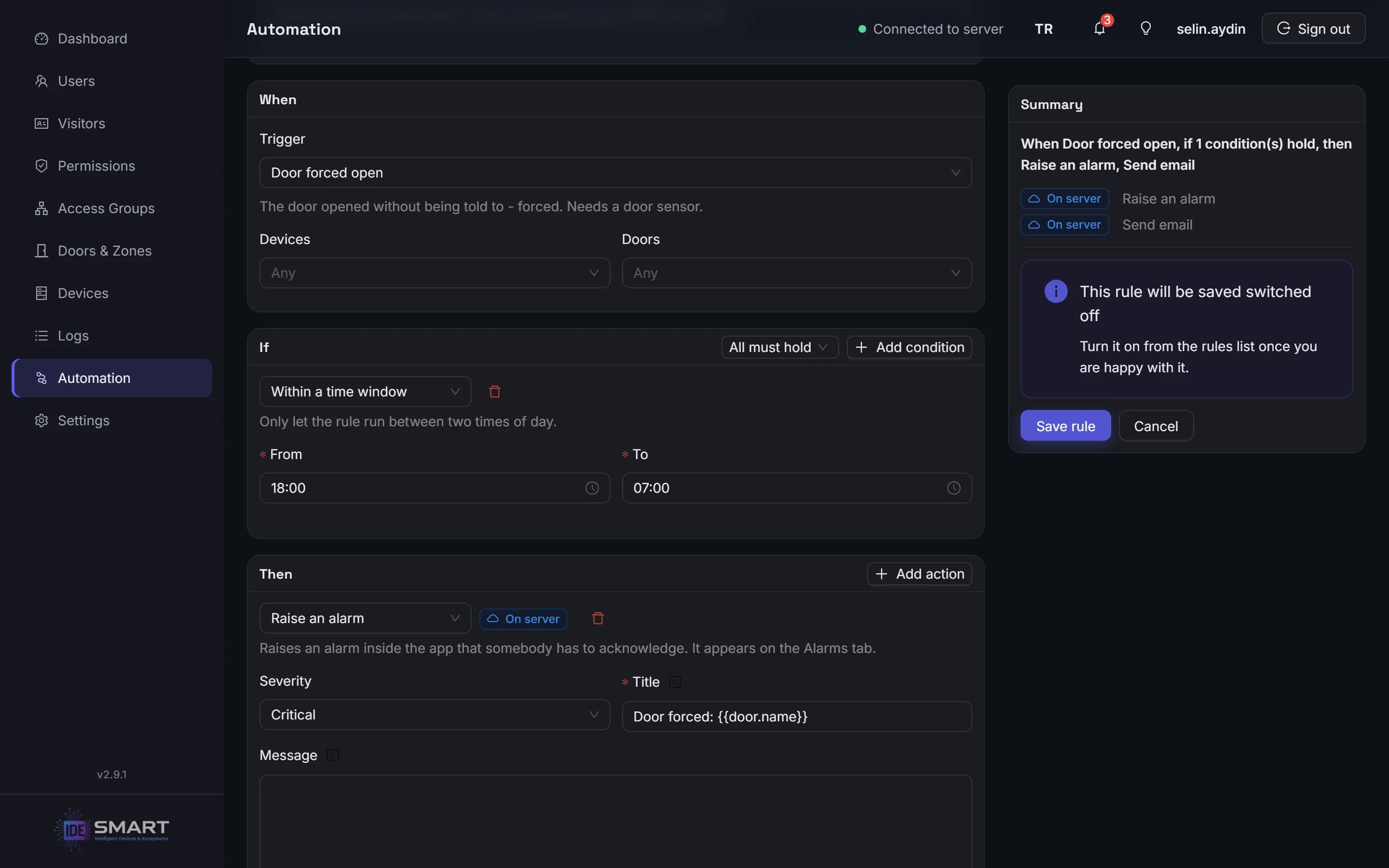
Use “When → If → Then” rules to connect events with the conditions and actions you define. Make door control, notifications and reporting part of your daily workflow.

  • Keep people informed: Send notifications through your own email server, create in-app alarms or schedule reports.

  • Take action: Open or lock doors and change the site's operating mode.

  • Connect workflows: Send HTTP requests to trigger actions in other systems.

Start with ready-made templates and test rules without affecting live operations. Rules that can run on the controller execute directly on the device.

The automation rule builder: When, If, Then

Reports and logs

See what happened. Understand why. Get the report you need.

Review access, presence, audit and device communication records in one interface. See why access was denied, and use the logs to trace events and operator actions.

  • Follow activity live. Monitor access events and zone occupancy in real time.

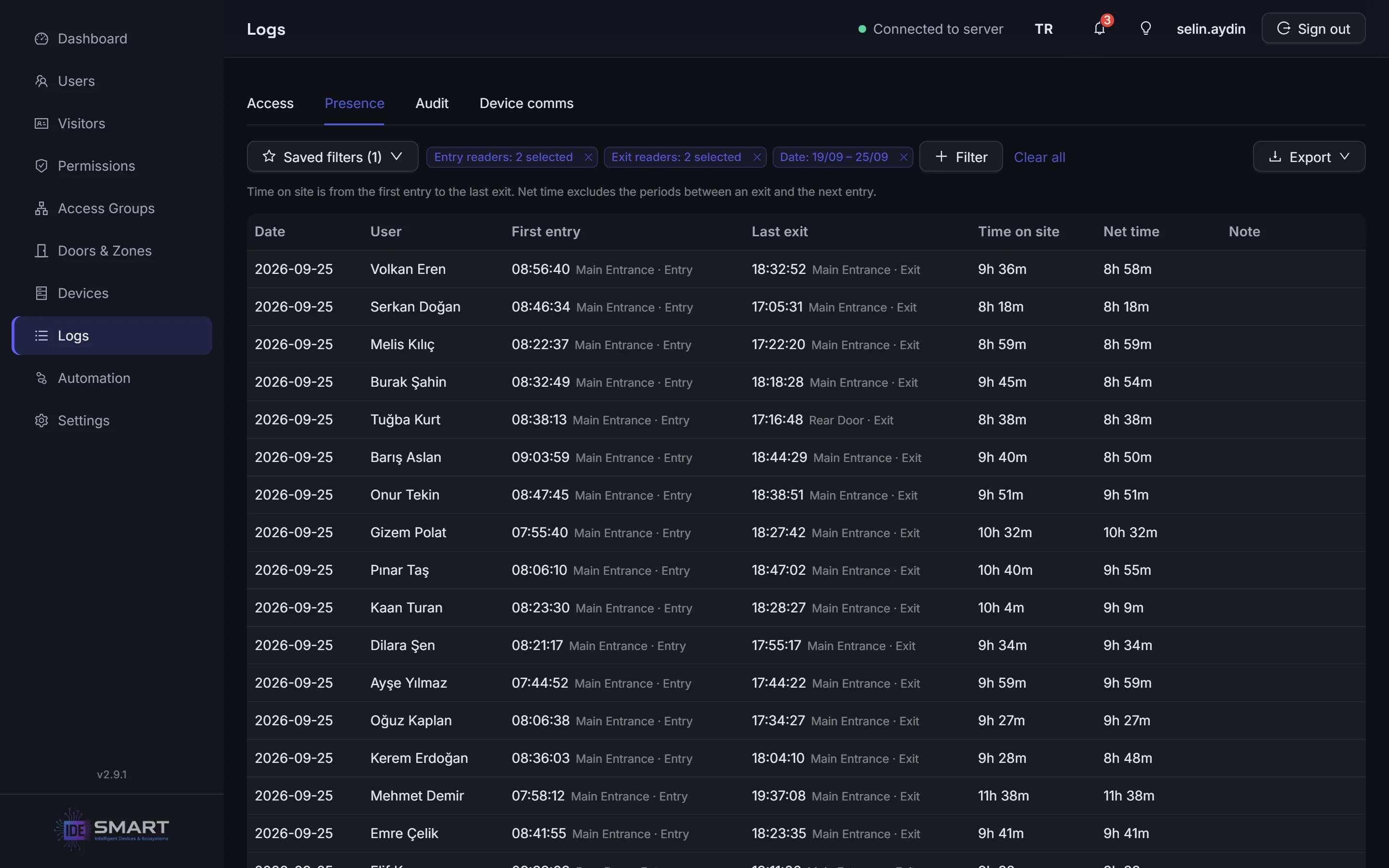
  • Review time on site. Presence reports show each person's first entry, last exit and time on site for each day.

  • Make regular reporting easier. Save filters, export results to CSV or Excel and schedule reports for delivery by email.

The presence report: first entry, last exit and time on site

Device management and updates

Simplify device management, from setup to updates.

Discover controllers on the network, add them by IP address or configure their Wi-Fi connection over Bluetooth. Handle setup and maintenance from one interface.

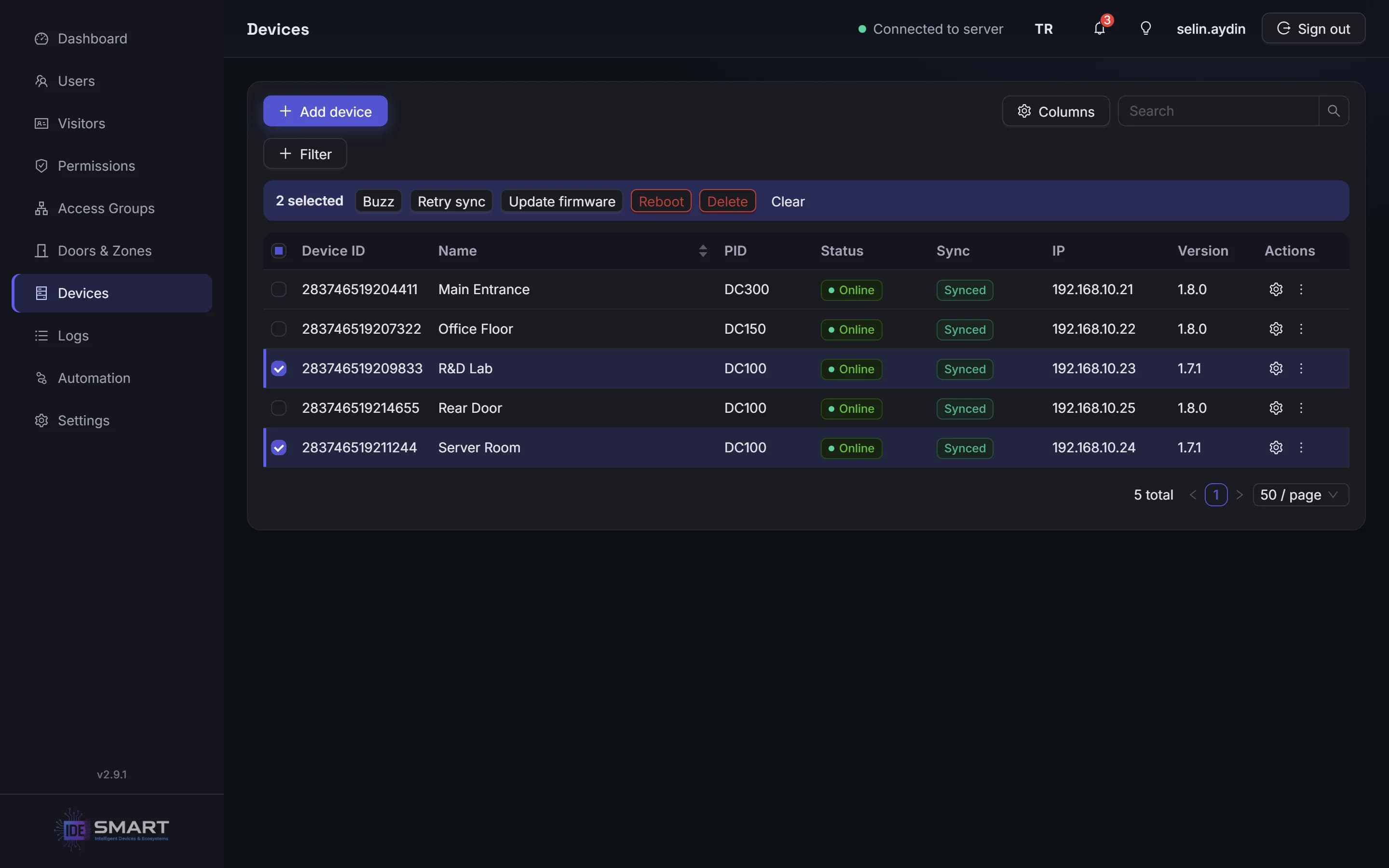
  • Plan firmware updates. Update controllers individually or in bulk, or schedule automatic updates to run each night at a time you choose.

  • Keep device clocks aligned. Use the built-in NTP server to synchronize controller clocks, including at sites without internet access.

  • Keep IDE Hub up to date. Receive new-version notifications and update the application in one click.

The device list with a bulk firmware update for the selected controllers

Visitors

Keep visitor access temporary and cards accounted for.

Register visitors with temporary permissions and track who holds each card in the visitor card pool. Trigger an automation rule when a visitor overstays, so overdue visits become part of your follow-up process.

Operators and permissions

Share responsibility. Define the limits.

Choose from more than 60 individual management permissions to give each operator the access their role requires. Limit their scope by door and zone, so each team member can focus on their area of responsibility.

Operators cannot grant permissions they do not hold themselves. Changes are recorded in the audit log with the person who made them.

Security and data

Keep data on site. Make backups routine.

Access data is stored in an encrypted database on the computer at your site. Browser connections use HTTPS, and controller connections use TLS.

Create encrypted backups when needed or schedule them automatically every 6, 12 or 24 hours.

Integration

Connect access events to your other workflows.

Every operation available in the IDE Hub web interface is also accessible through its API. Authenticate with API keys to connect your existing software, automate management tasks and integrate access control into your workflows.

Send HTTP requests to other systems from automation rules. Configure authentication with an API key, Basic, HMAC, OAuth2 or a client certificate.

Store each person's HR or directory-system key as an external ID to make records easier to match across systems. Export data to CSV or Excel for use in your existing reporting processes.

At a glance

  • Server installation: Windows 10 / 11, 64-bit
  • Turkish and English interface
  • Management through a computer or phone browser
  • Remote access without a VPN, port forwarding or static IP
  • Daily local operation without internet
  • Compatible controllers: IDE-DC100 · IDE-DC150 · IDE-DC300
  • Bulk and scheduled controller updates
  • One-click IDE Hub updates

Internet is required for initial setup, adding devices and remote access.

For integrators

Organize customer projects and support through one portal.

Manage customer projects, installations and remote access through the hub portal. Connect to an individual site with the customer's authorization and handle support tasks remotely when a visit is not needed.

See how IDE Hub fits your site.

Tell us about your doors, access requirements and daily workflows. We'll help you plan the right controllers and setup for your site.